How Gritty's AI fitness coach plans and adapts your training.
Program building, the tools Grit uses on your behalf, importing workouts from your watch or other apps, and the review loop that keeps your plan honest.
What Grit is
Gritty Fitness is an AI fitness coach app built around Grit — a coach who plans your training, watches every session you log, and adapts the plan after each one. Not a workout library. Not a generic tracker. A coach that owns your program across running, cycling, swimming, strength, mobility and recovery, and adjusts as your real performance comes in.
Building your program
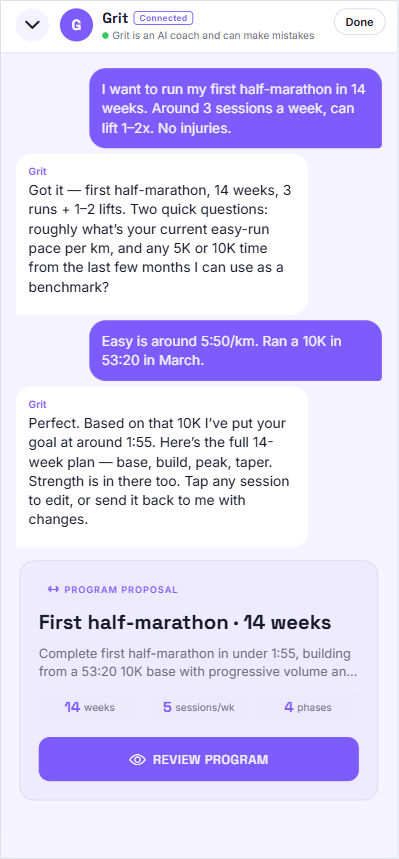
You tell Grit what you're training for in plain language — “sub-2 half-marathon in 14 weeks”, “put on muscle, three lifts a week”, “Ironman 70.3 in September”. Grit asks a few targeted questions about your schedule, equipment, history and relevant benchmarks (1RM, recent race times, FTP, CSS), then drafts the full block.
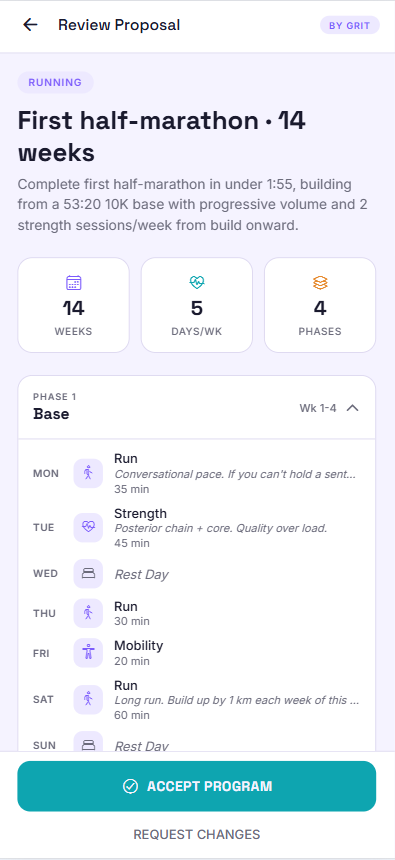
You see the whole program before anything is saved — phases, progressions, supporting work like dryland and mobility, recovery days. Edit any session inline, or ask Grit to rework a part. Nothing gets written to your plan until you tap Save.
What Grit can do, with examples
Grit acts through a small set of explicit tools so every change is visible and reversible.
- Propose a program. Full multi-sport block, presented as a single approve-or-edit card. Example: a 16-week marathon plan with two strength sessions and a weekly mobility block already built in.
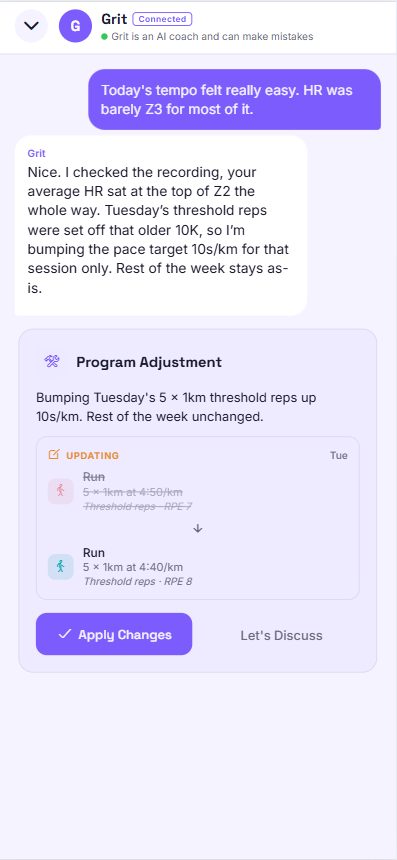
- Propose an edit.One-tap adjustments to upcoming sessions. Example: you mention the tempo run felt easy → Grit checks the recorded HR and proposes a +10s/km bump on next week's threshold work, before/after shown side by side.
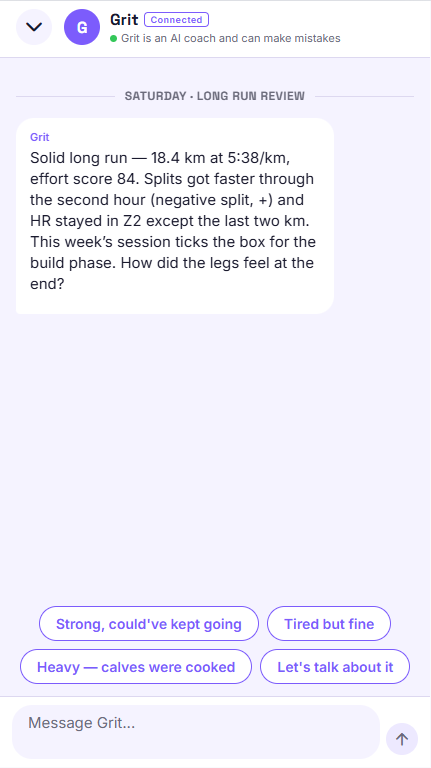
- Review every workout. After each session Grit reads effort, HR zones, splits and alignment with the plan, then writes a short review with quick replies you can tap to continue the conversation.
- Remember what matters. Tell Grit “I can't train Saturdays” or “left knee is sensitive on impact” and the preference is saved as a fact that shapes future proposals. You can list and forget them any time.
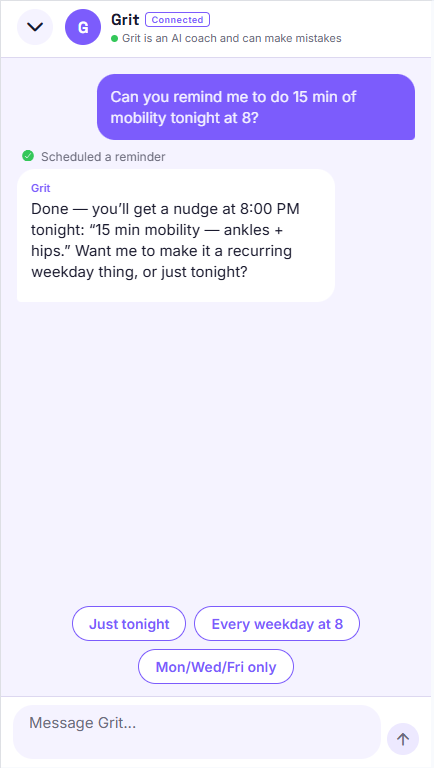
- Set reminders. Ask “remind me to do mobility tonight at 8” and Grit schedules a real push notification — no separate to-do app.
Connecting your workouts
A coach is only as good as the data it sees. Gritty doubles as a full AI fitness tracker — record in the app or import from anywhere.
- Record in-app. GPS recording for runs, rides, hikes and open-water swims, with optional pairing to any Bluetooth heart-rate strap. Manual logging for strength, mobility and indoor sessions, with pause/resume and HR-spike set detection.
- Apple Health (iOS). Pull workouts written by your watch or third-party apps. Preview each one, then save into Gritty with route, HR and splits intact.
- Health Connect (Android). One hub on the device collects workouts from Fitbit, Samsung Health, Strava, Whoop, Wear OS and other Health-Connect-aware apps — Gritty reads them through the same import preview.
- File imports. GPX, TCX, FIT, CSV — and ZIP bundles. Useful for exports from Garmin Connect, Suunto, Coros, Polar Flow, or anywhere else.
Every import goes through the same preview screen with route map, stats and HR chart, and you can link the import to a scheduled session before saving so Grit reviews it in context.
How Grit adapts after each session
As soon as a workout is saved — recorded, imported, or logged manually — Grit runs a review. It compares effort, HR distribution, pacing and splits against what the session was supposed to be, weighs it against your recent history and the rest of the week, and pulls in relevant context Grit already remembers about you.
If something needs to change, Grit proposes an edit. You see the before/after for the affected sessions, and one tap applies it. If you'd rather talk it through first, the same review opens a chat thread. Missed a session? Grit checks in the next morning and offers concrete reschedule options.
What we won't do
- Auto-apply changes. Every program edit is a proposal you approve. You stay in control of your plan.
- Sell your data. Stored on EU infrastructure, never shared with ad networks. Export or delete everything at any time.
- Lock essentials behind Premium. Recording, importing, the AI coach itself and a full program all work on the free tier.
- Pretend to be a doctor.Grit is a coach, not a medical professional. We're explicit about it across the app.
Frequently asked
- How does the AI coach decide what workout to plan next?
- Grit weighs your goal, the phase you're in, what you've already done this week, how recent sessions actually went (effort, HR, alignment), and anything you've told it to remember — like time constraints or a tender knee. Every proposed change is shown as a before/after card you approve.
- Does Grit need a smartwatch?
- No. Phone GPS plus an optional Bluetooth HR strap covers most sessions, and you can import everything from Apple Health, Health Connect (Fitbit / Samsung / Strava / Whoop / Wear OS), or GPX/TCX/FIT/CSV files exported from Garmin Connect and others.
- Can I train for more than one sport at the same time?
- Yes — that's the default. A marathon block includes strength and mobility. A triathlon block balances all three disciplines plus support work. You can also add ad-hoc activities (padel, hiking, football) and Grit factors them in.
- How long before Grit's adjustments feel personalised?
- After intake plus the first 1–2 weeks of recorded sessions. Benchmarks captured during intake set the initial paces and loads; the first few reviews calibrate them to how you actually train.
- Is this free?
- The full coach, program, recording and imports are free. Premium unlocks higher chat limits and deeper analytics — see Premium for details.
Want to see Grit in real conversations? Browse the examples gallery or read more on the Learn blog.